 Gabreel
What you get
Every frame has the same three parts, so viewers always know where to look:
- Top
- A short title for the current part of the reel, with the key phrase set in italics or on a coloured box.
- Middle
- Dark, product-style graphics that build on your words: lists that come into focus as you name each point, charts, numbers that count, screens, diagrams.
- Bottom
- Your avatar, talking, in a rounded frame. One or two caption words sit just above it.
Every few seconds your avatar takes the whole frame for one short sentence, such as the name of your method or the turn into the next point, and then hands the frame back to the graphics. That back and forth is what makes the reel feel like a person explaining something, not a slideshow.
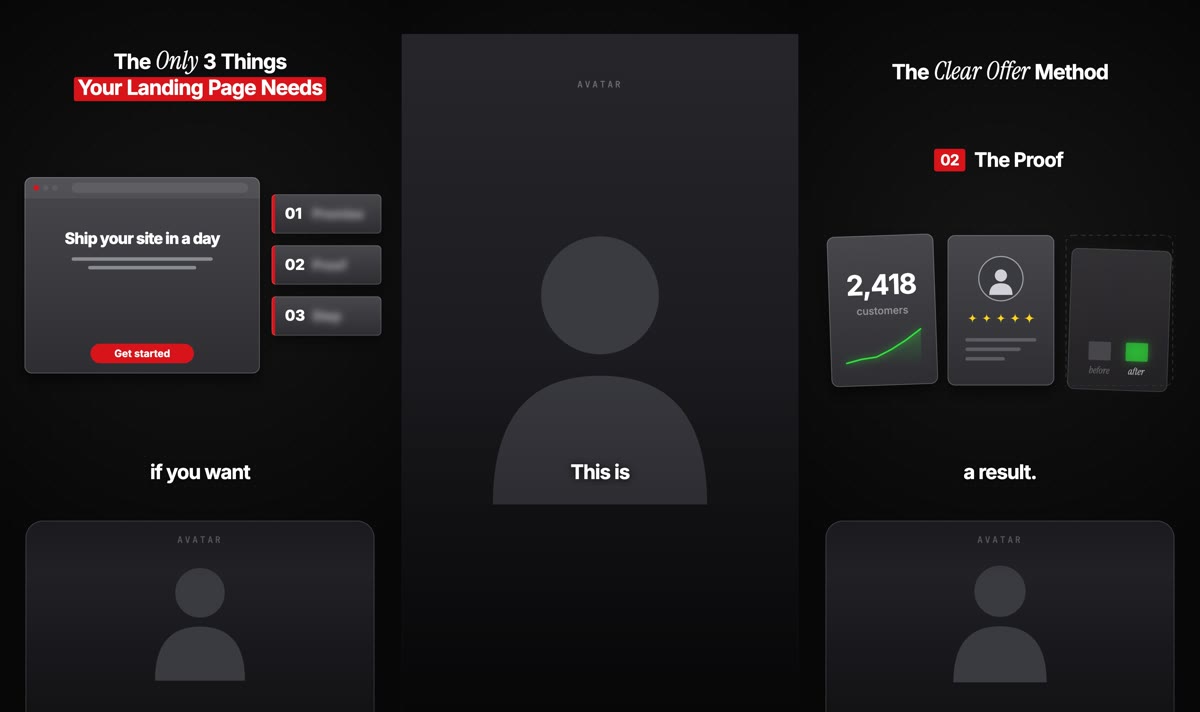
Best for lessons told to camera: a framework, a method with a name, “the three things”, marketing, business and creator advice.
What you need
- A Gabreel account
- Connected to your Claude or ChatGPT, like for every other theme.
- An ElevenLabs key
- For the voiceover. You add it once in Settings.
- A HeyGen account
- With an API key and credits. HeyGen makes the avatar video and bills it to your own HeyGen account.
- An avatar in HeyGen
- Your own avatar, or one of HeyGen’s public ones. An upright avatar framed from the chest up works best, because the reel is upright too. A landscape avatar works as well: its middle is used and the sides are cropped, so it appears closer when it takes the whole frame.
The other themes do not need HeyGen. This one does: your avatar fills the lower third of every frame, so Gabreel will not start an Avatar explainer reel until a key and an avatar are saved.
Set it up once
Copy your HeyGen API key
In HeyGen, open Settings, then API, and copy the key.Paste it into Gabreel
In Gabreel, open Brand, then the Voice & presenter tab, and find the HeyGen avatar card. Paste the key there. It is stored encrypted and is never shown to your AI. Do not paste a key into the chat.Choose your avatar
Press Choose avatar. My avatars lists the ones in your HeyGen account, HeyGen avatars the public ones. Pick one. It is used for every new reel until you change it.
You can also do the last step in the chat:
“Use Gabreel: show me my HeyGen avatars and let me pick one.”
Make a reel
Name the theme in your prompt:
“Make an avatar explainer reel about the 3 things every landing page needs.”
“Make a reel with my avatar as the host: why most newsletters lose subscribers in the first week.”
You can paste your own script instead of a topic. It is used word for word.
Then this happens, without you doing anything:
Script and voice
Your AI writes the script and Gabreel records it with your ElevenLabs voice.Avatar video
The finished voiceover goes to HeyGen, which renders your avatar saying it. This takes a few minutes and uses your HeyGen credits.Graphics
While HeyGen works, your AI designs and animates the graphics, timed to the words of the voiceover.Review and render
A draft is rendered and checked, problems are fixed, and the final reel lands in your dashboard as an upright 1080 × 1920 video.
How the avatar gets into the reel
The lips match because the voice comes first. HeyGen receives the finished voiceover and animates your avatar to that exact audio. The avatar video is as long as the reel, so every word your avatar says lines up with the captions and the graphics.
One avatar video per reel. The same video is shown in the frame at the bottom and, on the chosen sentences, across the whole frame. Nothing is rendered twice.
Your avatar’s own background. Gabreel asks HeyGen to leave the avatar’s background as it is, so the frame shows your avatar in its own setting, like a filmed creator.
Placement is automatic. You do not position anything. If your avatar sits too low, too high or too small in its frame, say so and it is adjusted.
Change things
Ask in plain words, the same as in any other theme:
“Move my avatar up a little in its frame and zoom in.”
“Show my avatar full screen on the last sentence too.”
“Replace the chart in the second part with a before and after comparison.”
Changes to the graphics, the titles, the captions or the avatar’s position cost nothing at HeyGen. Changes to the script or the voice do: the avatar has to speak the new audio, so HeyGen renders a new video and charges credits again. Settle the script first.
Good to know
- Cost
- HeyGen charges your HeyGen account for each avatar video, at its own prices per second. One avatar video is made per voiceover. Gabreel uses HeyGen’s Avatar III engine by default, the cheaper and faster one. It lip-syncs your avatar’s recorded footage, so the avatar moves the way you moved when you recorded it. You can ask for Avatar IV (about four times the price) or Avatar V (about seven times, HeyGen’s most natural motion) if your avatar supports them.
- Waiting time
- Expect a few extra minutes per reel for the avatar video.
- Scheduled reels
- Reels that Gabreel produces on its own from your planner are not made in this theme, because an avatar video spends your HeyGen credits. Make Avatar explainer reels in the chat, then schedule the finished reel.
- Accent colour
- The red accent follows your brand kit’s colour if you have one.
- Logos and footage
- The graphics use neutral icons, not the logos of other companies. Your own images and videos can be used: upload them to your asset library.
If something goes wrong
- “This style needs a HeyGen avatar”
- No key or no avatar is saved yet. Go through Set it up once.
- HeyGen rejected the key
- Copy the key again in HeyGen and save it again under Brand, Voice & presenter.
- Out of credits
- HeyGen refuses the avatar video and your AI tells you so. Top up in HeyGen, then ask it to make the avatar again.
- The final render is refused
- The avatar video is not in the reel yet. Either HeyGen is still rendering, or the avatar was never started. Ask your AI to fetch or start it.
- The head is cut off or too small
- Ask to move or zoom the avatar in its frame. An upright avatar framed from the chest up needs the least adjusting.
- The lips are out of sync
- The script or the voice changed after the avatar video was made. Ask for the avatar to be made again.